DirectiveKitsSign in

Directive Video Kit

Something worth showing.
Show it well.

Real footage, true captions, remade when things change. Your assistant turns your screen, your photographs and your numbers into short, branded video. Anything Remotion can draw, the kit can place, check and render. Every choice is yours.

See what you can make

A$149One payment · Not a subscription Works with Claude Code and Codex

THE SCREENING ROOMA SESSION, RECREATED
One launch demo, start to finish, in 63 seconds.A recreation of a working session in the Claude desktop app, following the kit's real steps and checks. Shiftwell, its café and its staff are invented.
Read what happens in it

Priya built Shiftwell, a rostering app for small cafés, and asks for a launch demo. Claude checks the machine and picks the demo recipe. It writes the brief and a truth file, which keeps an unfinished feature off screen. It records the app in a browser of its own, and Priya looks at every frame for anything private before the footage is used. The story passes its checks with one warning: a scene shows the whole screen, which is small on a phone. Claude reads it out, Priya chooses to zoom in, and she scrubs the result in Remotion Studio. The render ends on VIDEO VERIFIED and the finished demo plays. Three weeks later a button has been renamed. Claude records the app again, makes the old name a forbidden word, and remakes the demo with a vertical copy for LinkedIn, both checked.

08 recipesYour own Remotion scenes4K, ProRes & alphaYour files. Every version.

The material is already yours

Start with
what you have.

A screen recording. Your camera roll. The numbers in a spreadsheet. Bring the pieces; your assistant helps you find the story.

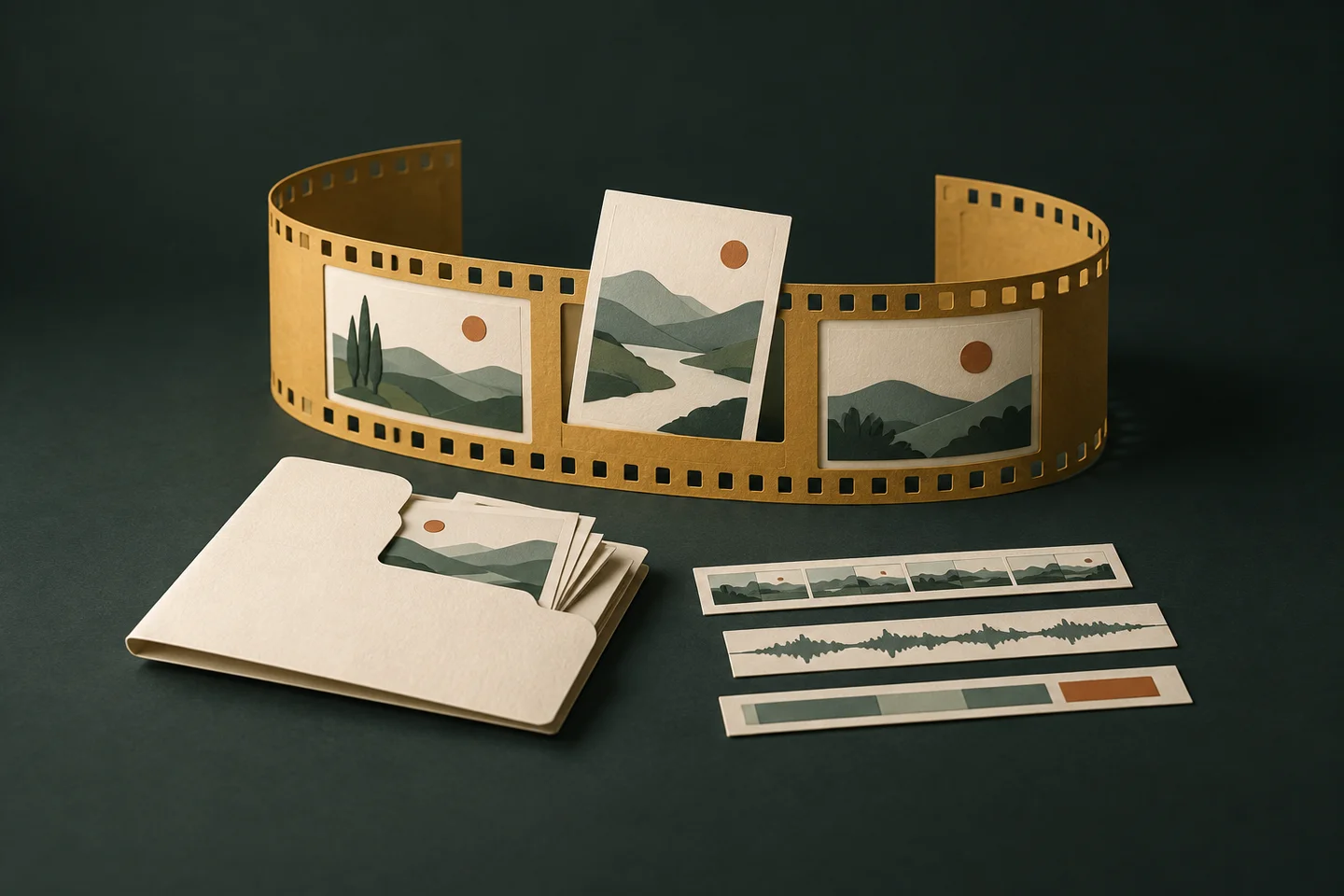
An illustrative paper editing desk: photographs, a chart and three timeline tracks lead to matching wide and vertical video frames.

Make room for your ideas. Record a screen, bring footage from your phone, or bring in a stock or generated clip from wherever you made it. Built on Remotion, with your assistant connecting the pieces.

Keep the story honest. Write down what is real, staged, generated or drawn. Labels stay with the footage, and a generated shot or a drawn screen never stands in as proof that something works.

Eight recipes. All included.

What do you
want to show?

A demo that gets to the point. A tutorial someone can follow. An announcement in two shapes. Pick a recipe to see what comes out.

Made with Video KitPlay the finished cut

Recipe 01 / 08

Demo

One real workflow, from the first click to the result.

20–35 seconds · 1920 × 1080

Made with the kit, from a screen recorded by hand.

Read what happens in it

A short introduction to Composer, a field-ordering application for specialty wholesalers. The video opens on a screen for choosing a field representative, then moves through the ordering workflow with on-screen captions and audio. It is a demonstration with sample data, not a live customer account, and the screen says so throughout.

Made with Video KitA frame from the example
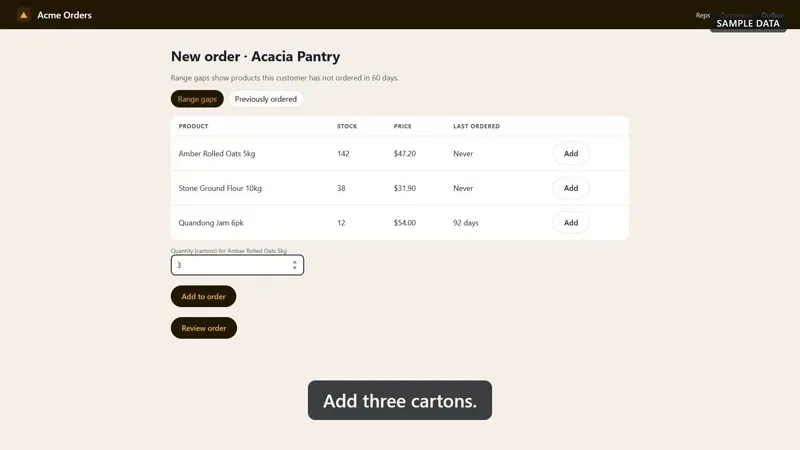
A frame from the Acme Orders recording: three cartons being added to an order, with the caption "Add three cartons" across the bottom

Recipe 02 / 08

Walkthrough

Numbered steps for somebody who already uses it and is stuck.

30–90 seconds · 1920 × 1080

A frame from the Acme Orders demo above.

Made with Video KitA frame from the example
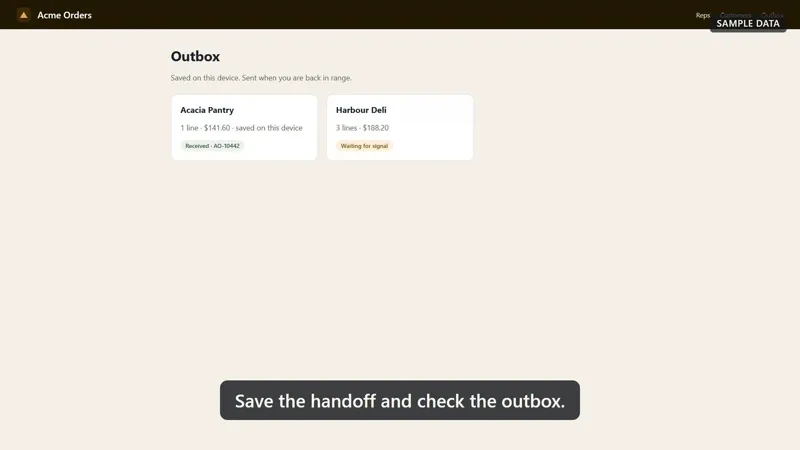
A frame from the Acme Orders recording: an outbox holding two saved orders, with the caption "Save the handoff and check the outbox" across the bottom

Recipe 03 / 08

Release note

One to three changes, each one shown working.

10–30 seconds · 1920 × 1080

A frame from the Acme Orders demo above.

Made with Video KitPlay the finished cut

Recipe 04 / 08

Social cut

Big captions, inside the safe areas, read with the sound off.

8–25 seconds · 1080 × 1920

Made with the kit, from a recorded working session.

Read what happens in it

A vertical cut of a recorded Claude Code session working on a sample dog day care business. The screen sits in the middle of a tall frame in the kit’s colours, with one caption at a time beneath it, and a label in the corner saying the business is a sample.

Made with Video KitA frame from the example
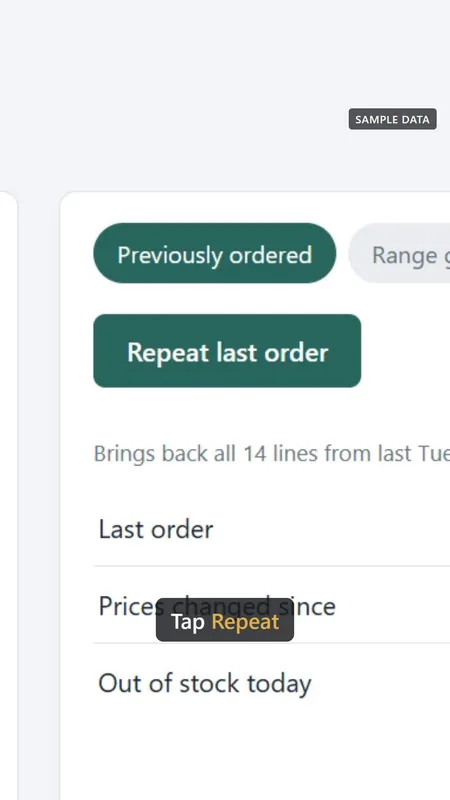
A frame from the kit’s tutorial fixture: a vertical crop of a sample ordering app with a Repeat last order button, and the caption "Tap Repeat" underneath with one word picked out in gold

Recipe 05 / 08

Tutorial

One tip, captioned word by word, for a phone feed.

30–60 seconds · 1080 × 1920

A frame from the kit’s tutorial fixture, captioned word by word.

Made with Video KitA frame from the example
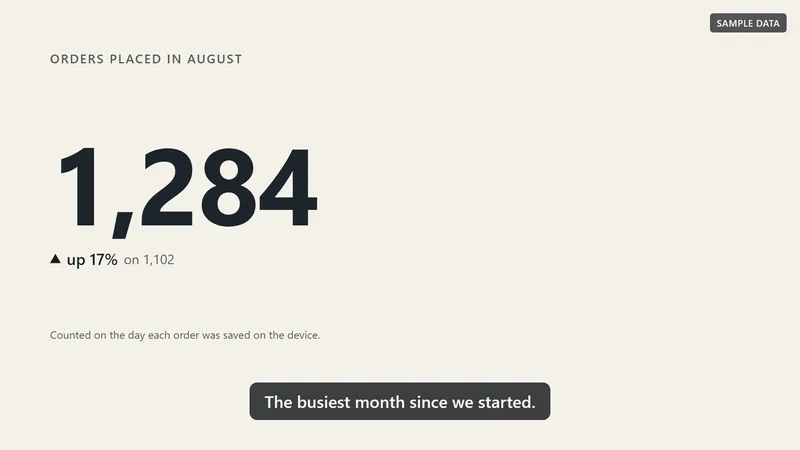
A frame from the kit’s recap fixture: the figure 1,284 across the screen under the heading "Orders placed in August", with "up 17% on 1,102" beneath it and the caption "The busiest month since we started."

Recipe 06 / 08

Monthly recap

The numbers that changed, drawn from a spreadsheet. Nothing to record.

15–40 seconds · 1920 × 1080

A frame from the kit’s recap fixture, drawn from a sample data file.

Made with Video KitA frame from the example
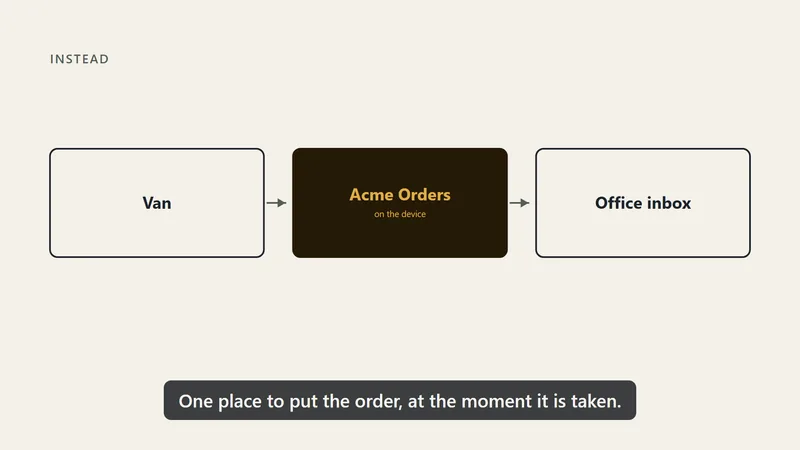
A frame from the kit’s explainer fixture: three boxes drawn in a row under the heading "Instead", Van, Acme Orders and Office inbox, joined by arrows, with the middle one filled in the brand colours

Recipe 07 / 08

Explainer

The idea before the product, over your footage or a generated shot.

45–90 seconds · 1920 × 1080

A frame from the kit’s explainer fixture, drawn by the kit itself.

Made with Video KitA frame from the example
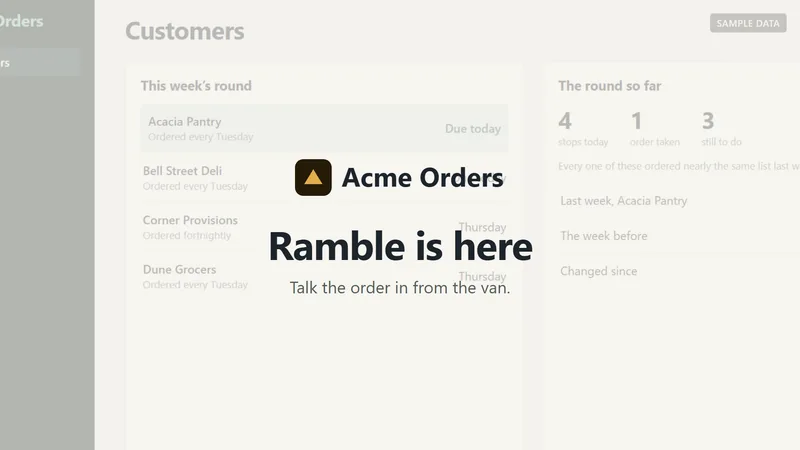
A frame from the kit’s launch fixture: the opening card, "Ramble is here", drawn over the first shot of a sample ordering app while the screen behind it dims

Recipe 08 / 08

Launch

The announcement, both shapes out of one story.

30–60 seconds · wide and vertical

A frame from the kit’s launch fixture, the wide cut of the two it makes.

These are real outputs from the kit. Sample apps and sample data are labelled in the examples. Each size and length is where a recipe usually lands, not a limit.

Recipes advise. You decide.

It says what a choice costs.
Then it is yours.

A demo that runs fifty seconds. A shader transition in a walkthrough. A video with no recording in it at all. The kit makes it, and says in a sentence what each choice costs and when it is fine. Your assistant reads you each note once, you decide, and it is not raised again.

npm run validate
  1. 50 seconds, where a demo usually runs 20 to 35
  2. an iris transition, which a demo does not usually use
  3. lower-third captions, not a demo’s usual style

STORY VALID, with three warnings. Nothing was stopped.

What still stops a render

  • Private data on screenA real name, email or account number is recorded again, never covered up, and a person says they looked at every frame.
  • Generated or drawn material passed off as realA generated clip, a stock shot or a drawn screen carries a label, and is never the scene that proves something works.
  • Anything publishing itselfThe kit ends at a checked file on your laptop. Putting it anywhere is you, after you have watched it.
  • Music and assets without the rightsMusic needs a line saying where the right to publish it comes from, and every fetched icon, animation or sound a licence that allows business use. A font without one is flagged.
  • A broken renderA missing file, a clip past the end of its recording, captions that overlap, or scene code that moves by the clock and would flicker.
  • Text nobody can readEvery caption is measured in a browser to fit its box, and every word on screen meets a 4.5:1 contrast floor.

Built on Remotion

Anything Remotion can draw.
Placed, checked, rendered.

Remotion is the engine that draws every frame. The kit puts all of it within your assistant’s reach, and holds what you make to the same checks as a recording.

  1. 01

    Your own scenes

    A phone or browser frame around your recording. An animated logo as your opening. 3D, a Lottie animation, anything written in Remotion. The kit places it, captions it, labels it and checks it like any other scene, and a whole composition of your own renders the same way.

  2. 02

    Transitions, marks and captions

    Every transition Remotion ships, the shader ones included. Circles, callouts, spotlights, blur, icons and images that follow the recording as the shot moves. Four caption styles: a block, word by word, a lower third, or subtitles.

  3. 03

    Assets, credited

    Icons, animated components from remocn, Remotion Elements, Lottie animations and sound effects. Each is recorded with where it came from and its licence, and a credits file sits beside the video when a licence asks for one.

  4. 04

    Any output

    Any size and frame rate, 4K and 60 frames a second included. Square and vertical cuts. ProRes for an editor, transparent ProRes 4444 to lay over other footage, WebM, H.265, a GIF and a poster frame. Every file is checked.

  5. 05

    Your packages

    Any package from npm, pinned, and put back after every kit update. Remotion’s paid Automators packages, such as cloud rendering and the Player, are yours to add on your own Remotion licence.

  6. 06

    Clips from anywhere

    A stock clip, or a clip from any generation service you use, comes in with one command. It is labelled on screen, and the service, the model and the prompt stay on record beside it.

From the first idea to the final frame

You tell the story.
The kit holds it together.

Footage, captions and sound, brought into one project you can keep working on. Your assistant walks you through five steps.

An illustrated three-scene edit, with separate footage, caption and sound tracks under one playhead.00:0000:0500:1000:1501 FOOTAGE02 WORDS03 SOUNDShow it.Explain it.Land it.Your opening lineThe part that mattersWhat happens next
An illustrated edit: footage, words and sound stay separate, so you can change one without starting over.
  1. 01

    Choose the shape

    Check your setup, set the pace and pick a recipe with your assistant.

  2. 02

    Write down the truth

    What is real, staged, generated or planned, before anything is made.

  3. 03

    Bring the footage

    Record it, let the kit capture your web app, or bring clips of your own.

  4. 04

    Find the words

    Shape the scenes, write the captions, and add a voice if you want one.

  5. 05

    Check the cut

    Every file is checked: format, captions and sound, with no black frames. Keep the video and its editable project.

How the kit keeps a video honest

The truth comes before the footage.

Your assistant records what the video may claim, and checks the captions against it. Generated, stock and drawn material carries a label. A claim that something works needs a real recording beneath it.

truth.md
  1. Live: choose a customer, build an order, save the handoff
  2. Staged: sample data, and the screen says so
  3. Generated: the opening shot, labelled on screen
  4. Illustrated: the phone frame, labelled on screen
  5. Planned: talk the order in from the van, label required
  6. Never say: “instantly”, “automatically”

Written and approved before anything is recorded. A caption that breaks it fails the build, and a generated clip or a drawn screen is never the proof that something works.

An illustrative gold paper film strip with one replaceable frame, kept beside a project folder and separate footage, caption and sound strips.

The next version is the point

Change one part.
Keep the whole story.

A new feature. A different offer. A better closing line. Open the project, say what changed, and make the next cut.

  • 01Swap a scene or re-record one part.
  • 02Update the words, the voice or the brand.
  • 03Render another shape from the same project.

Your footage, captions, brand settings and a record of what went in stay in the project folder on your laptop.

The price

One payment.
Then it is yours.

A$149

One payment · not a subscription

Ongoing cost. Your AI assistant: Claude Pro at US$20 a month, or Codex, included with any ChatGPT plan. Node.js and FFmpeg are free, with about 1.3 GB downloaded the first time you render. A stock voice needs a paid ElevenLabs plan, and a generation service charges whatever it charges, both on your own account. Remotion is free for organisations of up to three people. Which assistant.

  • The kit, with all eight recipes: demo, walkthrough, release note, social cut, tutorial, monthly recap, explainer and launch, and each new one as it lands
  • Automated capture for web apps, narration in your own voice or a stock one, and generated or stock clips brought in with a label
  • Your own Remotion scenes and compositions, every Remotion transition, twelve marks, four caption styles, and icons, animations and sounds with their credits
  • Any size and any file: square and vertical cuts, 4K, ProRes with transparency, WebM, H.265, a GIF and a poster, each one checked
  • The checks that run before you see the file, and the project that can make it again
  • Twelve months of updates and email support
  • Yours to keep, and yours to use, after the twelve months are up

Your kit and your library link go here. You can change it at checkout.

Straight away. Your kit arrives by email the moment payment goes through. Nothing to wait for, and nobody to chase.

Or your money back. Fourteen days to change your mind. Email us from the address you bought with, say "refund", and the money goes back to your card. Nothing else is needed.

Have a discount code? Enter it at checkout.

Available worldwide. Checkout shows one of our fixed currency prices, with applicable tax included.

Before you buy

A few good questions.

Something else on your mind? The support page has an email address that answers within a couple of business days.

Do I have to record it myself?

Often, and it is easier than it sounds: press record, do the thing once, stop. If it is a web app, the kit can drive the browser and record it for you instead. If there is nothing to record at all, a recap built from a spreadsheet needs no camera and no screen.

Expect one or two retakes the first time. Almost everybody records once, spots a wrong turn or a stray notification, and records again. That is normal.

Does it use AI video, and how do you keep it honest?

Yes, when you want it. Make a clip on any generation service you use, or download one from a stock library, and the kit brings it in with one command and cuts it in like any other clip, with the service, the model and the prompt on record.

Three things happen every time. It is written down in your truth file. It carries a label on screen, which you may word yourself but not remove. And a generated clip is never the proof that your product does something: if a caption says it works, what you see under that caption is a real recording. Setting a scene, filling a pause, opening or closing, that is fine; standing in for the thing working is not.

Before you pick a service, your assistant asks what the clip is for and whether recording it would be quicker, and reads you what that service’s own terms say about business use. The account is yours, and so is the bill.

Can I bring my own Remotion code?

Yes. A scene of your own sits in your project folder and takes its place in the story like any other: the kit times it, captions it, labels it and checks it. A whole composition of your own renders, finishes and is checked the same way, and so does an opening or a closing you made yourself.

The one thing the kit asks of your code is that it draws from the frame, not the clock, because Remotion draws frames out of order and anything timed by the clock would flicker. It names the file and the line when something would. Your scenes and your packages come through every kit update untouched.

Is there a voice, or just captions?

Your choice. Captions only is the default and works everywhere. Or record one line per caption in your own voice. Or use a stock voice on your own ElevenLabs account, which is the one option with a bill: a business video needs one of their paid plans, paid to them directly. No cloned voices, and a cloned voice on the account is refused.

What do I need on my laptop?

Claude Code or Codex, plus two free installs, Node.js and FFmpeg. The kit checks for all of it on the first run and says what is missing in plain words. The first render downloads about 1.3 GB of browser and renderer, once.

What does it actually cost to run?

Your assistant, and nothing else by default. Node.js, FFmpeg and Remotion are free at your size, rendering happens on your own machine, and there is no hosting bill because there is no hosting.

Two things can add a cost, both on your own account and both optional: a paid ElevenLabs plan if you want a stock voice, and whatever a generation service charges if you make clips with one. Remotion’s paid packages, if you ever want one, are on your own Remotion licence.

How long does a first video take?

An afternoon, most of which is deciding what the video should say. The second shape out of the same recording is much faster.

What happens when the product changes?

A wrong word or a new closing line: tell your assistant, and the next render is minutes away. A screen that now looks different: record that one part again, and the rest of the project stays as it was. Call it an hour, not an afternoon.

Does it post the video anywhere?

No. It hands you a file. Where it goes is yours to decide, and what to post alongside it is Social Kit’s job.

What is Remotion, and do I need a licence for it?

Remotion is the framework that draws the video, and it is the reason the kit can reach so much: transitions, captions, audio, animated charts, 3D. Its code is published under its own licence, which is free for individuals and for organisations of up to three people, counting contractors.

Above three, Remotion’s Creators option, which it describes as making video through code and prompting on your own machine, is currently US$25 per person per month. Its Automators option, with a US$100 monthly minimum, is for apps, the Player and cloud rendering, none of which the kit’s own commands use; they stay yours to add on your own licence. Remotion decides which option fits you, so if your team is four or more, read its page before you buy. Built with Remotion: remotion.pro/license.

Ready when you are

Your next story
starts here.

Bring something worth showing. Leave with a video you can use, and a project you can keep making your own.

Read the start guide firstSee Handbook Kit